Visit Methods Trigger Filters
- Get Started
- Troubleshooting and FAQ
- Release Notes
- AI Agents
- Patient Channel
- Triggers
- Technical Specifications
- Patient Facesheet
- Insights & Analytics
- Conversation Flows
- Campaigns
- SMS Basics
- Inbox
- Lines & Resources Requests
- Lines, Events, Resources
- Referrals
- Add-Ons
- Users and Groups
- Platform Settings and Configuration
- Self-Rescheduling
- Recalls
- Artera Harmony Federal Edition
- Marketplace
Organizations that have enabled Epic Visit Modes can use this information within Artera to send targeted Triggers and display the Visit Method on the Patient Facesheet.
This approach reduces the need for multiple visit types, making it much faster for admins to set up and maintain Triggers—especially for Telehealth and video appointments.
Visit Methods in Artera
Once your Visit Methods have been mapped to Artera, you will be able to:
-
Use Visit Method as an Appointment Trigger Filter. You can either start fresh with a new Trigger setup or simply add Visit Method to your current Triggers and deactivate the ones you no longer need.

-
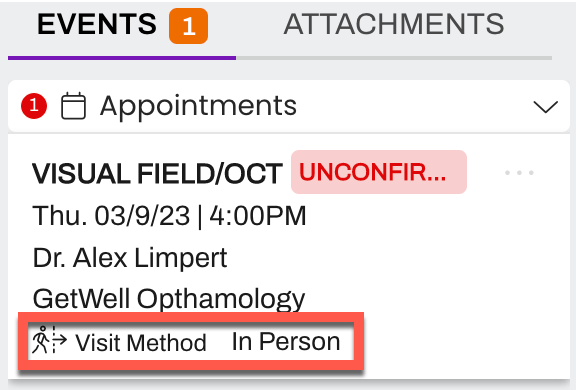
See the Visit Method as a tag on the upcoming Appointments tile in the Patient Facesheet.
Setting Up Visit Methods
Integration
Setup requires integration work to ingest Visit Mode data from Epic to Artera in an HL7 OBX segment. Please connect with your Customer Success Representative for additional information.
Artera supports mapping the Epic Visit Modes to three standard Visit Methods:
In-Person
Telehealth
Video
It is likely that multiple Visit Modes in Epic will be mapped to the same Visit Method in Artera.